

Training LoRA on Flux: Best Practices & Settings
At Finetuners.ai, one of our core activities is training models for clients. Our expertise comes from creating hundreds of models using Stable Diffusion infrastructure. As soon as Flux released its weights, we jumped on board and took the time to train about 50 models.
This guide will give you a better understanding of how to train amazing models, both on Stable Diffusion and, of course, on Flux.
The Process of Training
The training process consists of the following steps:
- Gathering and refining datasets (DS)
- Choosing training software
- Setting training parameters
- Testing model versions
Gathering & Refining Data Sets (DS)
The dataset, or the images you use to train your models, is by far the most important part of model training. Like fresh ingredients for a tasty meal, all images should be in perfect shape. By “perfect shape,” I mean:
- Good resolution: The minimum is 1024 x 1024.
- Correct ratio: For training on Flux, a 1:1 ratio is required. Crop your images accordingly and place the subject in the center. You can use this free tool for trimming: Birme.net.
- Sharpness: No blurry parts or artifacts; we need sharp images!
- Subject focus: The subject should be in the center. Avoid mixing subjects, and if you must have two subjects, make sure to mention this in the captioning (more on this below).
- Variety: Use different angles, lighting, and outfits to make the model more flexible.
- Quality over quantity: If an image is almost qualified but lacks a few properties, either fix it or remove it. You wouldn’t include a rotten carrot in your salad, even if it’s a small portion.
If your dataset isn’t ideal, use your favorite tools to fix some of the images. We often use AI upscaling and Photoshop to improve lighting on darker images.
Here’s the dataset we used to train our version of Crash Bandicoot. We collected the images from the internet and tried to stick with one version of Crash. The images below were upscaled, and some were refined and trimmed in Photoshop.
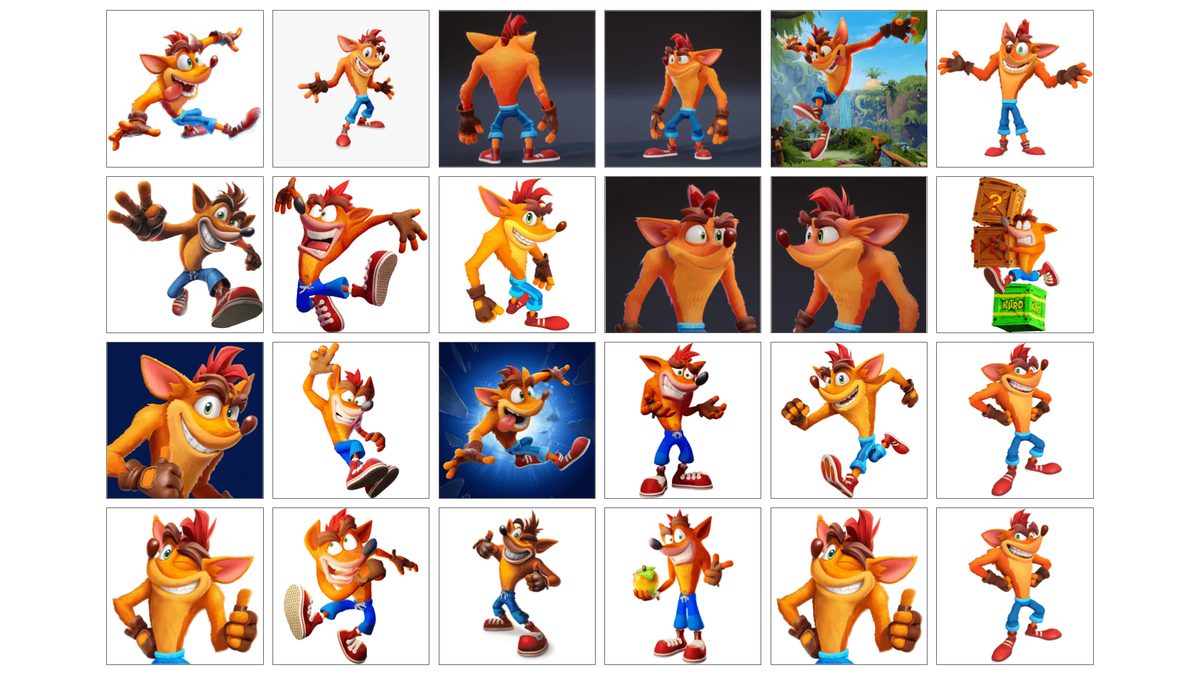
This set is okay. Crash always wears the same clothes, which is good, and we also have him in multiple poses, but not varied enough. Crash tends to repeat a similar posture in many images, which we’ll see reflected in the model’s output. Additionally, the rendering style of Crash varies in this set, meaning we’ll get an average of all the different Crashes—not ideal, but it’s what we have.
Notice, for example, the tie Crash has on his pants. Only 10% of the images had it, but still, almost every generated Crash image includes this detail.
(Flux already knows the concept of Crash Bandicoot, but not our version of it. Hence, when comparing Crash Bandicoot results, I will compare them with the original version of Flux versus the finetuned version.)
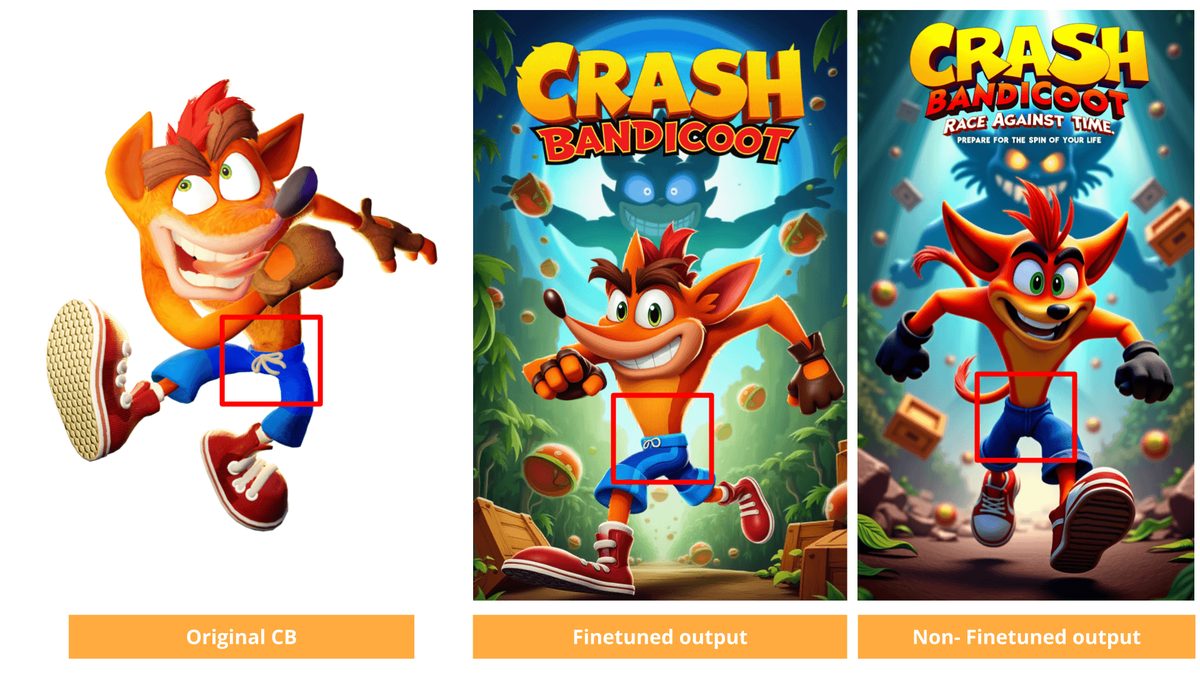
As you can see, Flux is very good at staying true to the dataset, even down to small details, which highlights the importance of a varied dataset. Since my Crash Bandicoot's posture in the dataset was not very diverse, the finetuned model's flexibility was limited.

In these examples, the non-finetuned version produced more flexible results with the same prompt, seed, and parameters.
Captions
Captions are the text that accompanies the images you send for training. If you’re training a single subject, like a human or an animal, you won’t need to use captions with Flux; you’ll be fine without them. However, if you’re training an illustrated character, captioning will significantly improve your results. This is because Flux has been trained on billions of human images and far fewer illustrated ones.
Captions help Flux better understand your images and will assist you in generating the subject when prompting later on.
A typical caption might look like this:“Crash Bandicoot, standing with thumbs up and a wide, toothy grin, dressed in blue pants and red sneakers with white laces, exuding confidence and positive energy, captures an upbeat and enthusiastic vibe, front-facing camera angle, vibrant and clean 3D style, white background.”
This tag-style captioning is popular with Stable Diffusion training. With Flux, I’m still unsure if this is the best approach, or if a more natural speech text would be better. We need to conduct more tests to determine the best method.
Captioning is an integral part of model training, but it’s also a huge time consumer, even with automatic captioning tools. So, when training humans you can probably skip this step. (Although I don't advise it!)
Quantity
How many images do you need? Ten is the minimum for a flexible yet stable model. As long as your images meet the quality standards, the sky's the limit in terms of maximum quantity. Models improve when trained on large, high-quality datasets. However, there’s a caveat: training with many images requires more resources, time, and patience. If you’re new to training, I don’t recommend going too high with the image count. It’s easy to mess up a large training session, and if you don’t need pixel-perfect accuracy, 20-30 images is a great starting point—especially with Flux, which has a vast data backbone to support your model.
Training Software
There are plenty of options. The two main ones are AI-Toolkit and Koyha SS. Both can run locally or in the cloud. There are already many tutorials on how to install them, so I’ll just list a few links to help you get started:
- Online:
- Local:
Training Parameters
I’ll address only the crucial parameters and the differences between AI-Toolkit and Koyha.
- Steps: The number of repetitions per image in your dataset. If you don’t repeat enough, the subject or style won’t catch on. Train too much, and it will burn out. The rule of thumb from our SDXL days is 100 steps per image. This means a dataset of 20 images should go through 2,000 steps in total.
- Learning rate: The rate at which the model learns. This parameter goes hand in hand with steps. If you’re using a slow learning rate, make sure to have more steps, and vice versa. There’s no one-size-fits-all setting, as each model is different. But since we can check the model versions along the way, we can pinpoint where the model was overtrained or undertrained and fine-tune accordingly.
- Batch size: The number of images trained at once. A higher batch size will speed up training but will also consume more VRAM. However, training with a batch size greater than one should provide the model with more context about the subject, leading to better results.
- Save every X steps: Saves a version of the model after every X steps. We find 250-step intervals to be precise enough for our needs.
Koyha-specific:
- Epochs: Koyha measures steps as follows: number of images x number of repeats x number of epochs = total steps. So, 10 images x 40 repeats x 10 epochs = 4,000 steps.
- Network dimensions: This impacts the quality of the outputs and the size of the LoRA. The default of 2 is too low; 16-32 network dimensions produced great results.
Testing Model Versions and Outputs
Finally, after a few hours, all the model versions are ready to be tested. The preview images generated during training give us hints about which model version works better, but of course, we need to take it to ComfyUI for further testing.
I’ve built a simple ComfyUI workflow that generates multiple results from different model variations using a list of prompts and the same seed per variation. The process takes a while, so I consider it part of the training. I let it run and check it about an hour later to compare the different results. Here are a few takeaways for readers versed in ComfyUI:
- Prompts: Flux likes long, poetic prompts. See the example below.
- LoRA strength: Surprisingly, I found that a strength of 1-1.3 produced good results that stayed true to the original subject without overexposing the image.
- Base shift: The lower it went, the less imaginative the outputs became, but the images were truer to the original.
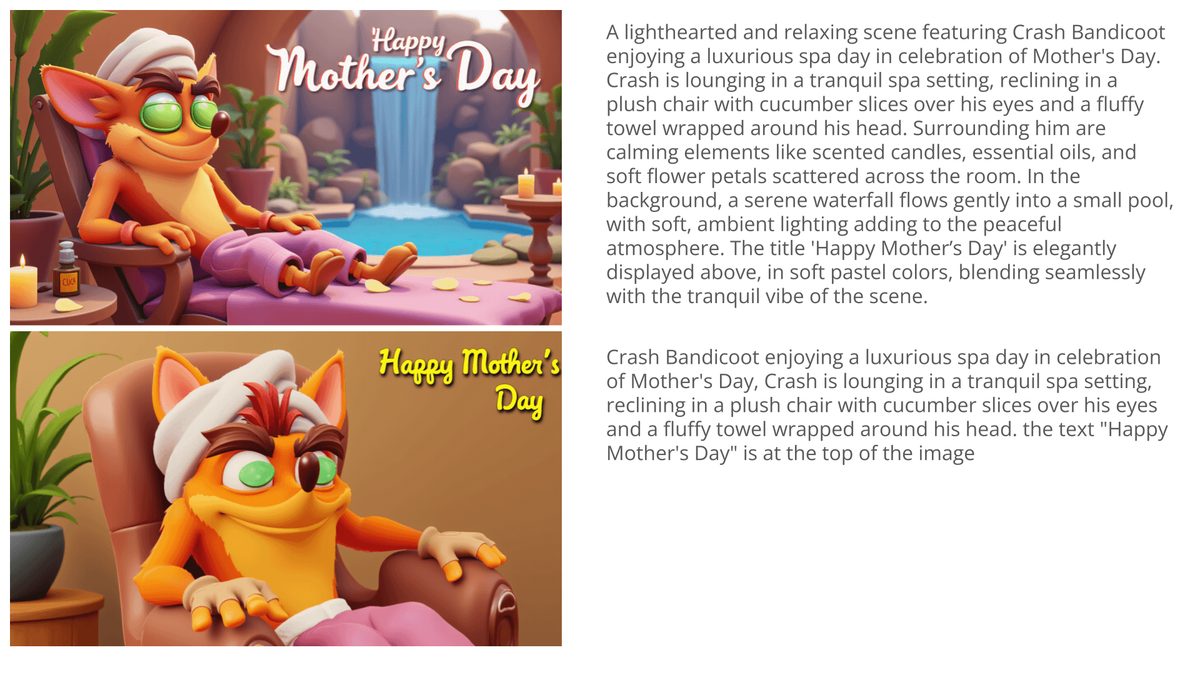
After testing the versions with about 50 outputs using different settings, I pick my winning version.
Training LoRA on Flux - Training for the masses!
Flux is a very forgiving model. Compared to SD1.5 and SDXL, where we had to be very precise with the training parameters and data sets, when it comes to realistic images Flux can handle almost anything. It’s hard to overtrain the model, and even with a small dataset, it’s able to produce good results.
Training realistic images is easier than training illustrated or artistic ones, which require more fine-tuning. But even with illustrations, unless you’re looking for a super accurate result, the default parameters (given a decent dataset) should work just fine.

For pro-level work, like products that need to look exactly like the original or IP characters with strict guidelines, more in-depth fine-tuning is required, like what we do at Finetuners.ai 🙂
The question that remains is, what exactly are Flux Dev’s (or Black Forest Labs’) terms for commercial use? It’s all nice and dandy for research, but we have eager customers ready to use it for real.